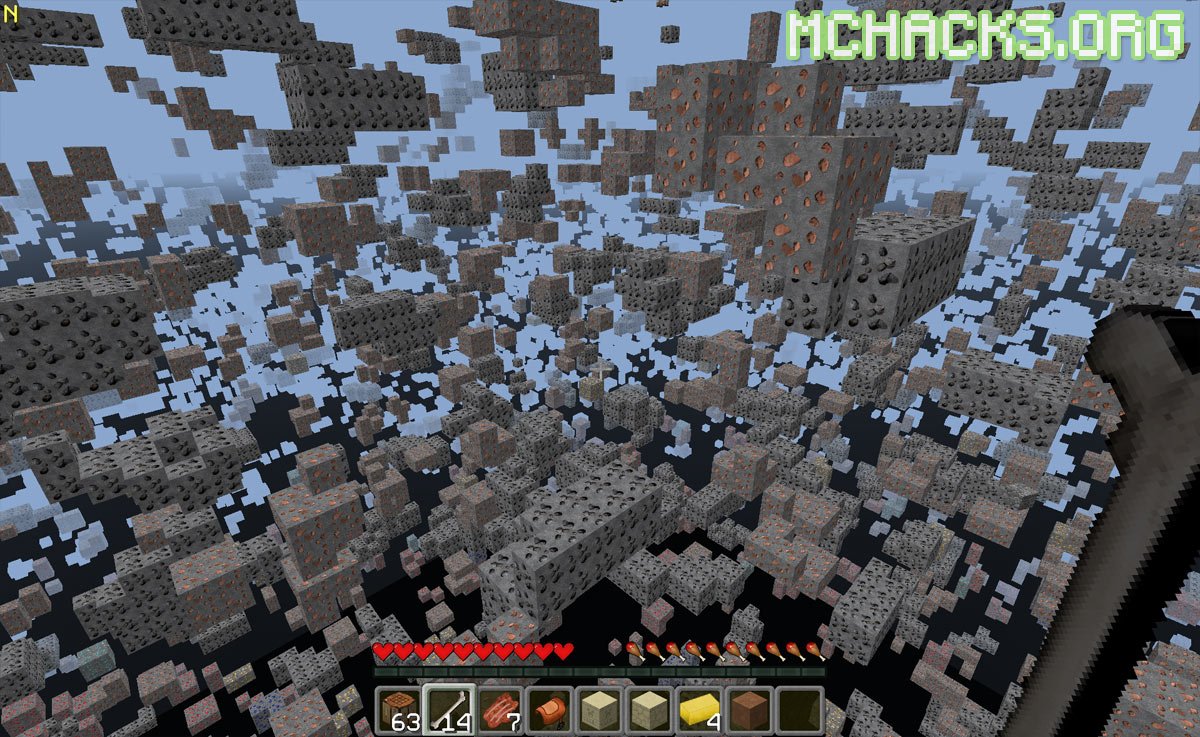
Nodus is one of the best known hacked clients for Minecraft. In this version, the code has been updated to work for the latest version of Minecraft.
It adds lots of features to Minecraft, for example fly hack, auto mine, wallhack, aimbot and lots of other features. Most of the features also works in multiplayer on Minecraft servers, but it is advised to use hacks with caution. Use at own risk!
Video
Screenshots
How to use Nodus
Keybinds:
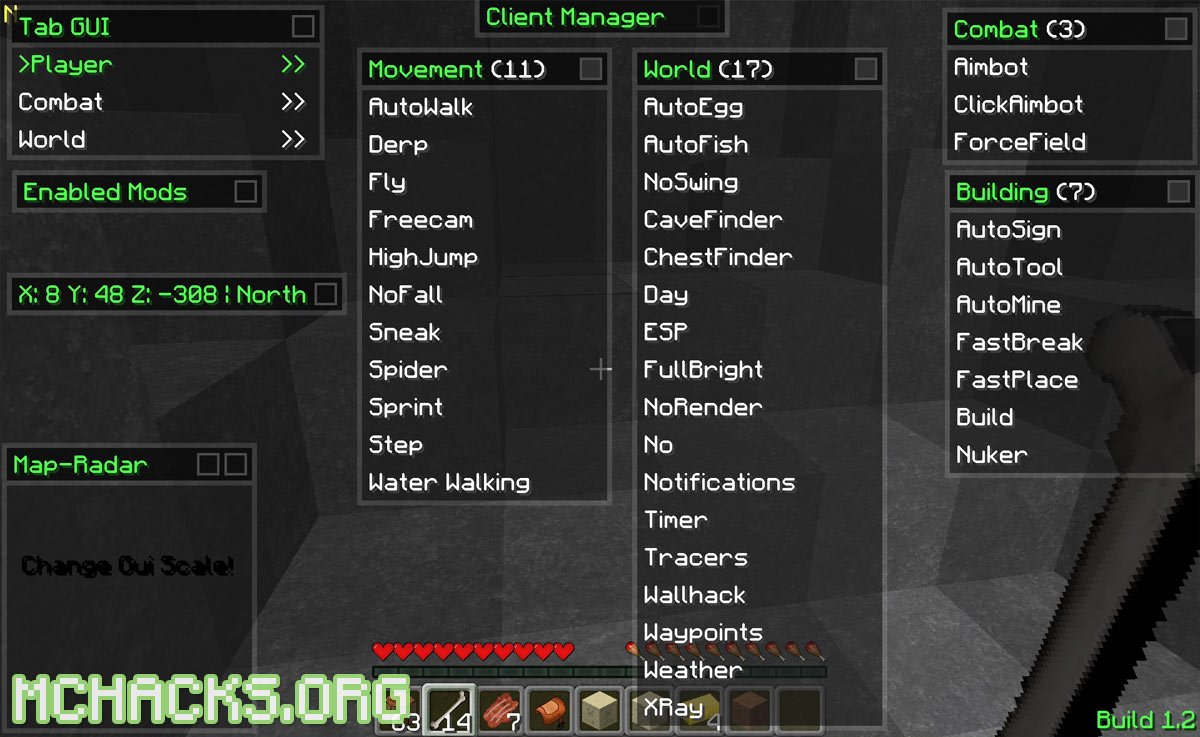
Y = GUI
U = Console
Features
- High Jump
- Auto Egg
- Auto Fish
- Derp
- Full Bright
- Auto Sign
- Auto Mine
- Auto Walk
- Click Aimbot
- Fast Break
- Step
- Waypoints
- Sneak
- Aimbot
- Timer
- Wallhack
- Build
- Force Field
- Day
- No Swing
- Freecam
- Weather
- Cave Finder
- Spider
- ESP
- Tracers
- Auto Tool
- Water Walking
- Xray
- No Render
- Text Radar
- Sprint
- No Fall
- Fly
- Chest Finder
- Nuker
- Fast Place
- Notifications
Versions
Compatible versions: Minecraft 1.6.4, 1.7.4
Nodus Changelogs
1. Basic / Client / Sourcecode
+ New class-structure [try to deobfuscate it, dear skids!]
+ Improved the obfuscater, smaller classes [also try to deobfuscate this, skids!]
* Client update to rel-1.7.2 (I didn’t used MCP to update this version, it took me 28 full hours of work…)
2. GUI
+ Added ‘add to friend list’ & ‘add to enemy list’ at radar
+ Color settings: right click -> lastcolor, left click -> nextcolor
* faster window dragging
* Improved the width / height variables [gives about 2 – 3 more FPS]
* Fixed Tooltip renderer
* Better “push” of windows
* Fixed some bugs at the radar
* Improved the radar
* Fixed some minor bugs
– The RearView is currently not working
3. Hacks
* Fixed the CaveFinder
* Improved FullBright
* Improved xRay
4. Chat
* Fixed TAB Complete
– message-stacking is currently not working
5. Hacks/Commands
+ Added browse-command (to open any website with default browser)
+ Liquids (water and lava) are breakable with the Water hack
+ Improved the Block-selection at Nuker
+ Added insult-command [and a special for kinky users…]
+ ForceField now with NoCheat-ByPass
+ Block one-hit function at Freecam
+ Added ‘check’-button at the Account Settings (no automatic check)
+ Cavefinder when stucking in freecam
* Fixed ‘chat’-command
* Fixed ‘tracer mode both’
* Fixed ‘aimbot mode both’
* Fixed ‘forcefield mode both’
Sorry, but I can’t add NoFlinch, AutoMine, AutoFish, AutoTool, AutoSoup, BlockESP & unpushable in this update.
There is currently no MCP, like already said…
Remake of the complete client from beginning to the end.
– Known issues:
– RearView doesn’t work
– TextRadar doesn’t work
Future updates:
– RearView
– Spectate
– IRC
– Account Settings
= Fixed Tab-Crashing
= Fixed Tab
= Fixed MAC OS X
= Improved MapRadar
= Improved TextRadar
= Improved Fly[Up-Down]Speed
= Improved FlySpeed [1.0 is normal walk speed]
= Fixed Nuker Block Selection
= Fixed Nuker
= Fixed Waypoint Crash at Invalid Color
= Speed UP BlockESP
= Unlagged BlockESP
= Improved ChestFinder – Rendering
= Improved NameTags
= Fixed Sprint
= Fixed ‘tracers mode both’
= Fixed ‘esp mode both’
= Fixed ‘forcefield mode both’
= Fixed ‘aimbot mode both’
= Improved Spider
= Improved Water
= Changed Tracer Skin
= Fixed Tab-Complete
= Fixed Sprint
= Fixed scrolling at click editor
= Fixed scrolling at Tab editor
= Fixed scrolling at Bind editor
= Changed Highlight of NameTags [Its now 100% in foreground]
= Improved Build
= Chestfinder now also respects doublechests [http://puu.sh/5sSBj.jpg]
= Improved Hightlight of Nuker
= Improved Hightlight of BlockESP
= Improved Fullbright
= Smoother Fullbright
= Fixed Disable Nametags
= Fixed ParticleTime at ESP
= Improved ESP
= Improved CaveFinder
= Fixed ParticleTime at Tracers
= Fixed ParticleTime at Nuker
= Fixed ParticleTime at Tracers
= Fixed ParticleTime at BlockESP
= Improved HighJump, height!
+ Added DoS – Tool – LOIC (low orbit ion cannon)
+ Chestfinder now in foreground
+ Readded “Move Up” and “Move Down” to Click Editor
+ Readded Scroll Bar at Click Editor
+ Fixed relation of mouse bug of Edit/Delete at Click Editor
+ Readded “Move Up” and “Move Down” to Tab Editor
+ Readded Scroll Bar at Tab Editor
+ Fixed relation of mouse bug of Edit/Delete at Tab Editor
+ Readded “Move Up” and “Move Down” to Bind Editor
+ Readded Scroll Bar at Bind Editor
+ Fixed relation of mouse bug of Edit/Delete at Bind Editor
+ Keybinds now can have more then 1 Command
+ Added ChestFinder tracer (use ‘chestfinder tracers’)
+ Added NodusButton Highlighting
+ Added ‘Reconnect’ to Ingame Menu
+ Added Nodus – “Reload” Command [Restart Nodus itself]
+ Improved Aimbot LookView
+ Fixed GUI Hightlightning
+ Fixed Build Bug
+ Added AutoBlock
+ Added Hack List
+ Added Build Mode Swastika
+ Added smoother ESP Off/On
+ Added smoother Tracers Off/On
+ Added BetterZoom [BowZoom]
+ Added Dolphin
+ Added BreadCrumb
+ Added Trajectories
+ Added Regen [AutoRegenerate]
+ Fixed Steal All
+ Bypassed Steal All
+ Fixed Steal List
+ Bypassed Steal List
+ Fixed Store List
+ Bypassed Store List
+ Fixed Skins
+ Fixed V.I.P Capes
+ Better Event System [Internal Change]
+ Better Class-Hooking
+ Readded IRC now finally [At least as long as the servers keep up…]
+ Added Autoblock
+ Added Glide
+ Added Unpushable
+ Added BowAimbot [like tha old school Nodus…]
+ Readded AutoRespawn
How to install Nodus hacked client for Minecraft
Always read the included readme/install instructions. Otherwise use this method to install:
- Download and extract the zip file.
- Navigate to “%appdata%/.minecraft/versions” folder.
- Move the “Nodus” folder to your versions folder. The Nodus folder should contain Nodus.jar and Nodus.json.
- Start the Minecraft launcher.
- Click “New Profile” and use the following settings:
- Profile name: Nodus
- Use verison: release Nodus
- Click “Save Profile”.
- Choose the newly created profile and start playing!
- It will tell you that there is a new update, just ignore this message as this is the most recent.
Video guide: how to install Minecraft hacks
good
once i put nodus onto my versions folder it aint popping up on my launcher?????
Try a “clean” install
wats a clean instll
Its where you clear your .minecraft to fix any problems
scroll to bottom of game versions and then it should be Release nodus
where can you find that?
you have to open the nodus.zip to the folder go into the folder drag the other nodus folder to your desktop then put that into your versions folder inside minecraft
That’s because Terraria doesn’t have a launcher… https://uploads.disquscdn.com/images/3c29fb91d3337388e8961b379d5c06ef667601b47c7506962cdaf5405fc3e487.jpg
Xray is not Good | just see Iron and coal :| no find diymond
Maybe your not be any diamonds DUH
You might need to set it up in a different way. But…
Try this download: http://www.minecraftdl.com/x-ray-mod/
HELP! I enable nodus and mc crashes! WHAT DA HELL HAPPENED HERE MAN FIX THIS.
You might have nuker on?
Also, this comes up…
—- Minecraft Crash Report —-
// Quite honestly, I wouldn’t worry myself about that.
Time: 11/10/13 18:59
Description: Unexpected error
java.lang.NullPointerException
at TRN_SirJava376785263764352957671.M_SirJava5779664564641795943756774617257686152(Unknown Source)
at TRN_SirJava5274702667344614643.M_SirJava0370727470785679445870(Unknown Source)
at TRN_SirJava5274702667344614643.M_SirJava6043504544872724378746742537060715141(Unknown Source)
at TRN_SirJava107737827747632745527076246459.M_SirJava21485067746644970627737253(Unknown Source)
at TRN_SirJava107737827747632745527076246459.M_SirJava7755416564697557158(Unknown Source)
at TRN_SirJava107737827747632745527076246459.M_SirJava7552656168567062795357(Unknown Source)
at net.minecraft.client.main.Main.main(Unknown Source)
A detailed walkthrough of the error, its code path and all known details is as follows:
—————————————————————————————
— Head —
Stacktrace:
at TRN_SirJava376785263764352957671.M_SirJava5779664564641795943756774617257686152(Unknown Source)
at TRN_SirJava5274702667344614643.M_SirJava0370727470785679445870(Unknown Source)
at TRN_SirJava5274702667344614643.M_SirJava6043504544872724378746742537060715141(Unknown Source)
— Affected level —
Details:
Level name: MpServer
All players: 1 total; [TRN_SirJava59427775264086885650[‘kevinlopez464’/92, l=’MpServer’, x=35.09, y=22.24, z=2754.91]]
Chunk stats: MultiplayerChunkCache: 265
Level seed: 0
Level generator: ID 01 – flat, ver 0. Features enabled: false
Level generator options:
Level spawn location: World: (-47,4,2595), Chunk: (at 1,0,3 in -3,162; contains blocks -48,0,2592 to -33,255,2607), Region: (-1,5; contains chunks -32,160 to -1,191, blocks -512,0,2560 to -1,255,3071)
Level time: 8562 game time, 8562 day time
Level dimension: 0
Level storage version: 0x00000 – Unknown?
Level weather: Rain time: 0 (now: false), thunder time: 0 (now: false)
Level game mode: Game mode: creative (ID 1). Hardcore: false. Cheats: false
Forced entities: 70 total; [TRN_SirJava970667654873725345[‘Slime’/19, l=’MpServer’, x=0.69, y=5.58, z=2698.06], TRN_SirJava725156471665648627953605147[‘Bat’/18, l=’MpServer’, x=-11.90, y=3.28, z=2748.84], TRN_SirJava970667654873725345[‘Slime’/21, l=’MpServer’, x=11.66, y=4.00, z=2747.41], TRN_SirJava970667654873725345[‘Slime’/20, l=’MpServer’, x=8.69, y=5.00, z=2726.06], TRN_SirJava574176485442614447755985036073456962[‘Villager’/23, l=’MpServer’, x=12.41, y=4.00, z=2756.25], TRN_SirJava574176485442614447755985036073456962[‘Villager’/22, l=’MpServer’, x=15.75, y=4.00, z=2755.53], TRN_SirJava48595714742414459725041685767346[‘item.tile.notGate’/25, l=’MpServer’, x=27.53, y=4.13, z=2724.59], TRN_SirJava48595714742414459725041685767346[‘item.item.seeds’/24, l=’MpServer’, x=30.59, y=5.13, z=2717.81], TRN_SirJava574176485442614447755985036073456962[‘Villager’/27, l=’MpServer’, x=27.50, y=4.00, z=2739.99], TRN_SirJava574176485442614447755985036073456962[‘Villager’/26, l=’MpServer’, x=27.78, y=4.00, z=2729.59], TRN_SirJava574176485442614447755985036073456962[‘Villager’/29, l=’MpServer’, x=25.34, y=5.00, z=2750.47], TRN_SirJava574176485442614447755985036073456962[‘Villager’/28, l=’MpServer’, x=28.28, y=4.00, z=2737.94], TRN_SirJava574176485442614447755985036073456962[‘Villager’/31, l=’MpServer’, x=21.35, y=5.00, z=2739.60], TRN_SirJava574176485442614447755985036073456962[‘Villager’/30, l=’MpServer’, x=22.39, y=5.00, z=2751.15], TRN_SirJava574176485442614447755985036073456962[‘Villager’/34, l=’MpServer’, x=23.03, y=5.00, z=2753.69], TRN_SirJava574176485442614447755985036073456962[‘Villager’/35, l=’MpServer’, x=21.38, y=5.00, z=2761.31], TRN_SirJava574176485442614447755985036073456962[‘Villager’/32, l=’MpServer’, x=28.48, y=4.00, z=2743.69], TRN_SirJava574176485442614447755985036073456962[‘Villager’/33, l=’MpServer’, x=18.31, y=4.00, z=2767.31], TRN_SirJava574176485442614447755985036073456962[‘Villager’/38, l=’MpServer’, x=23.50, y=4.00, z=2761.22], TRN_SirJava574176485442614447755985036073456962[‘Villager’/39, l=’MpServer’, x=24.34, y=4.00, z=2756.78], TRN_SirJava574176485442614447755985036073456962[‘Villager’/36, l=’MpServer’, x=26.38, y=4.00, z=2756.22], TRN_SirJava574176485442614447755985036073456962[‘Villager’/37, l=’MpServer’, x=21.69, y=7.00, z=2765.06], TRN_SirJava574176485442614447755985036073456962[‘Villager’/42, l=’MpServer’, x=21.14, y=5.00, z=2753.69], TRN_SirJava574176485442614447755985036073456962[‘Villager’/43, l=’MpServer’, x=26.63, y=4.00, z=2761.75], TRN_SirJava574176485442614447755985036073456962[‘Villager’/40, l=’MpServer’, x=25.47, y=4.00, z=2766.97], TRN_SirJava970667654873725345[‘Slime’/41, l=’MpServer’, x=14.93, y=4.01, z=2752.78], TRN_SirJava574176485442614447755985036073456962[‘Villager’/46, l=’MpServer’, x=25.54, y=4.00, z=2766.26], TRN_SirJava574176485442614447755985036073456962[‘Villager’/47, l=’MpServer’, x=20.88, y=6.50, z=2765.69], TRN_SirJava574176485442614447755985036073456962[‘Villager’/44, l=’MpServer’, x=25.22, y=4.00, z=2757.16], TRN_SirJava574176485442614447755985036073456962[‘Villager’/45, l=’MpServer’, x=25.88, y=4.00, z=2757.32], TRN_SirJava574176485442614447755985036073456962[‘Villager’/51, l=’MpServer’, x=24.97, y=4.00, z=2755.47], TRN_SirJava574176485442614447755985036073456962[‘Villager’/50, l=’MpServer’, x=24.07, y=5.00, z=2753.41], TRN_SirJava970667654873725345[‘Slime’/49, l=’MpServer’, x=24.97, y=4.00, z=2759.68], TRN_SirJava574176485442614447755985036073456962[‘Villager’/48, l=’MpServer’, x=22.47, y=4.00, z=2756.16], TRN_SirJava48595714742414459725041685767346[‘item.item.seeds’/55, l=’MpServer’, x=37.72, y=5.13, z=2715.88], TRN_SirJava48595714742414459725041685767346[‘item.item.wheat’/54, l=’MpServer’, x=39.75, y=4.13, z=2715.38], TRN_SirJava725156471665648627953605147[‘Bat’/53, l=’MpServer’, x=26.72, y=6.10, z=2777.19], TRN_SirJava574176485442614447755985036073456962[‘Villager’/52, l=’MpServer’, x=31.63, y=4.00, z=2757.69], TRN_SirJava574176485442614447755985036073456962[‘Villager’/59, l=’MpServer’, x=39.31, y=4.00, z=2728.75], TRN_SirJava574176485442614447755985036073456962[‘Villager’/58, l=’MpServer’, x=34.76, y=4.00, z=2732.02], TRN_SirJava574176485442614447755985036073456962[‘Villager’/57, l=’MpServer’, x=35.51, y=4.00, z=2731.27], TRN_SirJava48595714742414459725041685767346[‘item.item.carrots’/56, l=’MpServer’, x=40.75, y=5.13, z=2717.13], TRN_SirJava574176485442614447755985036073456962[‘Villager’/63, l=’MpServer’, x=34.38, y=4.00, z=2743.78], TRN_SirJava574176485442614447755985036073456962[‘Villager’/62, l=’MpServer’, x=32.47, y=4.00, z=2751.44], TRN_SirJava574176485442614447755985036073456962[‘Villager’/61, l=’MpServer’, x=36.29, y=4.00, z=2739.65], TRN_SirJava574176485442614447755985036073456962[‘Villager’/60, l=’MpServer’, x=45.41, y=4.00, z=2736.84], TRN_SirJava574176485442614447755985036073456962[‘Villager’/68, l=’MpServer’, x=41.78, y=5.00, z=2766.56], TRN_SirJava574176485442614447755985036073456962[‘Villager’/69, l=’MpServer’, x=32.38, y=4.00, z=2752.94], TRN_SirJava574176485442614447755985036073456962[‘Villager’/70, l=’MpServer’, x=33.57, y=4.00, z=2754.01], TRN_SirJava574176485442614447755985036073456962[‘Villager’/71, l=’MpServer’, x=38.94, y=4.00, z=2756.44], TRN_SirJava574176485442614447755985036073456962[‘Villager’/64, l=’MpServer’, x=47.69, y=4.00, z=2749.22], TRN_SirJava574176485442614447755985036073456962[‘Villager’/65, l=’MpServer’, x=36.47, y=4.00, z=2741.78], TRN_SirJava574176485442614447755985036073456962[‘Villager’/66, l=’MpServer’, x=47.78, y=5.00, z=2743.38], TRN_SirJava574176485442614447755985036073456962[‘Villager’/67, l=’MpServer’, x=35.41, y=5.00, z=2765.31], TRN_SirJava574176485442614447755985036073456962[‘Villager’/76, l=’MpServer’, x=40.66, y=4.00, z=2761.47], TRN_SirJava574176485442614447755985036073456962[‘Villager’/77, l=’MpServer’, x=37.50, y=5.00, z=2755.25], TRN_SirJava574176485442614447755985036073456962[‘Villager’/78, l=’MpServer’, x=47.94, y=6.00, z=2762.38], TRN_SirJava574176485442614447755985036073456962[‘Villager’/79, l=’MpServer’, x=35.44, y=5.00, z=2767.28], TRN_SirJava574176485442614447755985036073456962[‘Villager’/72, l=’MpServer’, x=33.82, y=4.00, z=2757.69], TRN_SirJava574176485442614447755985036073456962[‘Villager’/73, l=’MpServer’, x=36.44, y=5.00, z=2762.07], TRN_SirJava574176485442614447755985036073456962[‘Villager’/74, l=’MpServer’, x=33.04, y=5.00, z=2761.53], TRN_SirJava574176485442614447755985036073456962[‘Villager’/75, l=’MpServer’, x=36.44, y=5.00, z=2762.66], TRN_SirJava574176485442614447755985036073456962[‘Villager’/85, l=’MpServer’, x=65.75, y=5.00, z=2774.69], TRN_SirJava574176485442614447755985036073456962[‘Villager’/84, l=’MpServer’, x=51.22, y=6.00, z=2757.38], TRN_SirJava574176485442614447755985036073456962[‘Villager’/81, l=’MpServer’, x=35.44, y=4.00, z=2769.56], TRN_SirJava574176485442614447755985036073456962[‘Villager’/80, l=’MpServer’, x=39.50, y=4.00, z=2770.44], TRN_SirJava574176485442614447755985036073456962[‘Villager’/83, l=’MpServer’, x=49.38, y=4.00, z=2751.63], TRN_SirJava574176485442614447755985036073456962[‘Villager’/82, l=’MpServer’, x=55.41, y=4.00, z=2750.31], TRN_SirJava59427775264086885650[‘kevinlopez464’/92, l=’MpServer’, x=35.09, y=22.24, z=2754.91], TRN_SirJava970667654873725345[‘Slime’/94, l=’MpServer’, x=-22.38, y=4.85, z=2822.41]]
Retry entities: 0 total; []
Server brand: vanilla
Server type: Integrated singleplayer server
Stacktrace:
at TRN_SirJava5049627656595194253.M_SirJava0075416069795858424173(Unknown Source)
at TRN_SirJava107737827747632745527076246459.M_SirJava53635850456653659706361646673(Unknown Source)
at TRN_SirJava107737827747632745527076246459.M_SirJava7552656168567062795357(Unknown Source)
at net.minecraft.client.main.Main.main(Unknown Source)
— System Details —
Details:
Minecraft Version: 1.6.4
Operating System: Windows 7 (x86) version 6.1
Java Version: 1.7.0_21, Oracle Corporation
Java VM Version: Java HotSpot(TM) Client VM (mixed mode, sharing), Oracle Corporation
Memory: 88349624 bytes (84 MB) / 329334784 bytes (314 MB) up to 518979584 bytes (494 MB)
JVM Flags: 2 total; -XX:HeapDumpPath=MojangTricksIntelDriversForPerformance_javaw.exe_minecraft.exe.heapdump -Xmx512M
AABB Pool Size: 5189 (290584 bytes; 0 MB) allocated, 2 (112 bytes; 0 MB) used
Suspicious classes: TRN_SirJava7341797877546570650, TRN_SirJava4774644541657404352, TRN_SirJava474207859554146636435243548, …]
IntCache: cache: 0, tcache: 0, allocated: 0, tallocated: 0
Launched Version: Nodus
LWJGL: 2.9.0
OpenGL: Intel 945GM GL version 1.4.0 – Build 8.14.10.1930, Intel
Is Modded: Very likely; Jar signature invalidated
Type: Client (map_client.txt)
Resource Pack: Default
Current Language: English (US)
Profiler Position: N/A (disabled)
Vec3 Pool Size: 886 (49616 bytes; 0 MB) allocated, 13 (728 bytes; 0 MB) used
Ok try re downloading minecraft latest version and then re downloading java… Once you have done that go to wizard hax and download whatever mod or hack you would like to install if you need anyhelp skype msg me: tom_k-w12
did you extracr it? i dint do that and i kinda got the same prob as you, no able to go on SMP.
I am so lost, I followed the instructions exactly and it is not working. The version Nodus is not showing up
Make A Folder Named Nodus
and Put .rar and .json there
the problem is that the names of the .jar and .json need to be the same as the name of the folder ..
also in the .json file (if you open it with notepad++) it reads the “id” at the top .
it also needs to be the same as the foldername and file names .
only then will it see it ..
if it still does not work then enable the checkbox where you can see snapshot versions in the launcher profile editor
Please watch the install video
It’s because you need to download minecraft… https://uploads.disquscdn.com/images/2817c8ff6cdd44798163953ce717d866f1107a5527852abc1524c1d89b7e3727.jpg
how to use xray??
Have you downloaded and installed it? If you have open MC and just press x,y or l
u smel lel
Who? ASKED!
press x
no, press alt f4
LOL DUDE YOU ARE NOT GOOD AT THIS ALT + F4 = CLOSE WINDOW NOOB?
Like this https://uploads.disquscdn.com/images/a65d36abf5515033f70159d8bf34f2b48b2596f43bfaa1e64a9b7d6d36d199c2.jpg
i dont get the nodus release in my launcher
Me Neither
and i kept re downloading it like 5 times
I download it finally got it in the versions but how do i get out of the clinet managemant after ive selected my mods?
Just press ‘Y’ I think?
it not working
how do u get nodus to show up
Press ‘Y’ Normally
I think i know what was wrong, do not directly post the Nodus 1.6.4 but pull out the file within named ‘Nodus’ and place that into your versions folder.
there is no auto fishing
Depending on what hack you get, they dont always work and if you are on a server they might have a plugin to stop it…
the 1.7 and up ones don’t have auto fishing.
why icant open the pop up?
lol
its called a snapshot but it still doesn’t work
The Download link isn’t working. They tell me ‘This XML file does not appear to have any style information associated with it. The document tree is shown below.
AccessDeniedAccess Denied
62DAD459E138C609
dVPrtu1I68yvpkfsPisHhQj5510fNrVOds8T+mKtFPkPNbTI6NvgnK5tKOc1CUI6
‘
Link is fixed
Does this work for mac?
Ok guys I would like a good server and a pvp buddy i have some really good hacks and I have a good pc and connection. I really want to find new server 100 player plus and just dominate at pvp… I use force field and double sprint ad if its an o.p server i might use fly aswell please reply and just help me…
I did everything I put release nodus and it wouldn’t let me play at all. It just keeps on popping up the play button
why arn’t the skins working?
It’s a bug
which is better Beta or Alpha? (Might sound stupid but I would appreciate an answer :P)
Beta
I’ve done everything correctly and yes i’ve watched the video, it still does not work
My launcher just closes then reopens i have tried multipie videos downloads and ways of doing it please HELP!!!!!!!!!!
Try another hack man…
http://www.mchacks.org/gemini-hacked-client/
either you did not follow the steps .
or you are not using minecraft
otherwise it should work
I love nodus i got it this morning and it rocks but I havent used on a server
when i go on SMP i crash. ._.
Same here
look my crash is :
—- Minecraft Crash Report —-
// You should try our sister game, Minceraft!
Time: 12/23/13 10:20 PM
Description: Unexpected error
java.lang.NullPointerException
at TRN_SirJava376785263764352957671.M_SirJava5779664564641795943756774617257686152(Unknown Source)
at TRN_SirJava5274702667344614643.M_SirJava0370727470785679445870(Unknown Source)
at TRN_SirJava5274702667344614643.M_SirJava6043504544872724378746742537060715141(Unknown Source)
at TRN_SirJava4170727416504236277651.M_SirJava67935367596342978(Unknown Source)
at TRN_SirJava107737827747632745527076246459.M_SirJava21485067746644970627737253(Unknown Source)
at TRN_SirJava107737827747632745527076246459.M_SirJava7755416564697557158(Unknown Source)
at TRN_SirJava107737827747632745527076246459.M_SirJava7552656168567062795357(Unknown Source)
at net.minecraft.client.main.Main.main(Unknown Source)
A detailed walkthrough of the error, its code path and all known details is as follows:
—————————————————————————————
— Head —
Stacktrace:
at TRN_SirJava376785263764352957671.M_SirJava5779664564641795943756774617257686152(Unknown Source)
at TRN_SirJava5274702667344614643.M_SirJava0370727470785679445870(Unknown Source)
at TRN_SirJava5274702667344614643.M_SirJava6043504544872724378746742537060715141(Unknown Source)
at TRN_SirJava4170727416504236277651.M_SirJava67935367596342978(Unknown Source)
— Affected level —
Details:
Level name: MpServer
All players: 15 total; [TRN_SirJava59427775264086885650[‘NormanDoes090’/44400, l=’MpServer’, x=0.81, y=76.62, z=3.01], TRN_SirJava6759679776371772534671555497859[‘SugarCandySwirl’/44391, l=’MpServer’, x=0.50, y=75.00, z=0.50], TRN_SirJava6759679776371772534671555497859[‘PlatinZockerHD’/44399, l=’MpServer’, x=0.50, y=77.25, z=0.50], TRN_SirJava6759679776371772534671555497859[‘Marbel3’/42967, l=’MpServer’, x=4.81, y=75.00, z=0.19], TRN_SirJava6759679776371772534671555497859[‘rochedudo’/44359, l=’MpServer’, x=1.59, y=73.00, z=20.00], TRN_SirJava6759679776371772534671555497859[‘tow3000’/44383, l=’MpServer’, x=-2.72, y=75.00, z=4.50], TRN_SirJava6759679776371772534671555497859[‘joel80741’/44395, l=’MpServer’, x=-1.59, y=75.00, z=0.88], TRN_SirJava6759679776371772534671555497859[‘christoph131’/44401, l=’MpServer’, x=-2.50, y=77.00, z=-9.50], TRN_SirJava6759679776371772534671555497859[‘copter2003’/44092, l=’MpServer’, x=-4.97, y=75.00, z=-1.56], TRN_SirJava6759679776371772534671555497859[‘Legend1am’/43466, l=’MpServer’, x=11.25, y=75.00, z=-10.09], TRN_SirJava6759679776371772534671555497859[‘Tookes20’/44394, l=’MpServer’, x=0.47, y=75.00, z=-1.25], TRN_SirJava6759679776371772534671555497859[‘Pie647’/43595, l=’MpServer’, x=39.09, y=73.00, z=-0.28], TRN_SirJava6759679776371772534671555497859[‘Nlourdel’/44242, l=’MpServer’, x=24.94, y=73.00, z=36.47], TRN_SirJava6759679776371772534671555497859[‘darkwarrior241’/44298, l=’MpServer’, x=8.56, y=68.00, z=45.50], TRN_SirJava6759679776371772534671555497859[‘cooncar’/44283, l=’MpServer’, x=6.31, y=68.00, z=43.38]]
Chunk stats: MultiplayerChunkCache: 20
Level seed: 0
Level generator: ID 00 – default, ver 1. Features enabled: false
Level generator options:
Level spawn location: World: (0,75,0), Chunk: (at 0,4,0 in 0,0; contains blocks 0,0,0 to 15,255,15), Region: (0,0; contains chunks 0,0 to 31,31, blocks 0,0,0 to 511,255,511)
Level time: 35319191 game time, 36010440 day time
Level dimension: 0
Level storage version: 0x00000 – Unknown?
Level weather: Rain time: 0 (now: false), thunder time: 0 (now: false)
Level game mode: Game mode: adventure (ID 2). Hardcore: false. Cheats: false
Forced entities: 29 total; [TRN_SirJava59427775264086885650[‘NormanDoes090’/44400, l=’MpServer’, x=0.81, y=76.62, z=3.01], TRN_SirJava6759679776371772534671555497859[‘rochedudo’/44359, l=’MpServer’, x=1.59, y=73.00, z=20.00], TRN_SirJava6759679776371772534671555497859[‘SugarCandySwirl’/44391, l=’MpServer’, x=0.50, y=75.00, z=0.50], TRN_SirJava6759679776371772534671555497859[‘darkwarrior241’/44298, l=’MpServer’, x=8.56, y=68.00, z=45.50], TRN_SirJava6759679776371772534671555497859[‘PlatinZockerHD’/44399, l=’MpServer’, x=0.50, y=77.25, z=0.50], TRN_SirJava6759679776371772534671555497859[‘Marbel3’/42967, l=’MpServer’, x=4.81, y=75.00, z=0.19], TRN_SirJava6759679776371772534671555497859[‘Nlourdel’/44242, l=’MpServer’, x=24.94, y=73.00, z=36.47], TRN_SirJava6759679776371772534671555497859[‘rochedudo’/44359, l=’MpServer’, x=1.59, y=73.00, z=20.00], TRN_SirJava6759679776371772534671555497859[‘Legend1am’/43466, l=’MpServer’, x=11.25, y=75.00, z=-10.09], TRN_SirJava6759679776371772534671555497859[‘tow3000’/44383, l=’MpServer’, x=-2.72, y=75.00, z=4.50], TRN_SirJava6759679776371772534671555497859[‘christoph131’/44401, l=’MpServer’, x=-2.50, y=77.00, z=-9.50], TRN_SirJava6759679776371772534671555497859[‘joel80741’/44395, l=’MpServer’, x=-1.59, y=75.00, z=0.88], TRN_SirJava6759679776371772534671555497859[‘Legend1am’/43466, l=’MpServer’, x=11.25, y=75.00, z=-10.09], TRN_SirJava6759679776371772534671555497859[‘copter2003’/44092, l=’MpServer’, x=-4.97, y=75.00, z=-1.56], TRN_SirJava6759679776371772534671555497859[‘tow3000’/44383, l=’MpServer’, x=-2.72, y=75.00, z=4.50], TRN_SirJava6759679776371772534671555497859[‘Pie647’/43595, l=’MpServer’, x=39.09, y=73.00, z=-0.28], TRN_SirJava6759679776371772534671555497859[‘Tookes20’/44394, l=’MpServer’, x=0.47, y=75.00, z=-1.25], TRN_SirJava6759679776371772534671555497859[‘darkwarrior241’/44298, l=’MpServer’, x=8.56, y=68.00, z=45.50], TRN_SirJava6759679776371772534671555497859[‘Nlourdel’/44242, l=’MpServer’, x=24.94, y=73.00, z=36.47], TRN_SirJava6759679776371772534671555497859[‘cooncar’/44283, l=’MpServer’, x=6.31, y=68.00, z=43.38], TRN_SirJava6759679776371772534671555497859[‘SugarCandySwirl’/44391, l=’MpServer’, x=0.50, y=75.00, z=0.50], TRN_SirJava6759679776371772534671555497859[‘cooncar’/44283, l=’MpServer’, x=6.31, y=68.00, z=43.38], TRN_SirJava6759679776371772534671555497859[‘PlatinZockerHD’/44399, l=’MpServer’, x=0.50, y=77.25, z=0.50], TRN_SirJava6759679776371772534671555497859[‘Tookes20’/44394, l=’MpServer’, x=0.47, y=75.00, z=-1.25], TRN_SirJava6759679776371772534671555497859[‘joel80741’/44395, l=’MpServer’, x=-1.59, y=75.00, z=0.88], TRN_SirJava6759679776371772534671555497859[‘copter2003’/44092, l=’MpServer’, x=-4.97, y=75.00, z=-1.56], TRN_SirJava6759679776371772534671555497859[‘Marbel3’/42967, l=’MpServer’, x=4.81, y=75.00, z=0.19], TRN_SirJava6759679776371772534671555497859[‘Pie647’/43595, l=’MpServer’, x=39.09, y=73.00, z=-0.28], TRN_SirJava6759679776371772534671555497859[‘christoph131’/44401, l=’MpServer’, x=-2.50, y=77.00, z=-9.50]]
Retry entities: 0 total; []
Server brand: craftbukkit
Server type: Non-integrated multiplayer server
Stacktrace:
at TRN_SirJava5049627656595194253.M_SirJava0075416069795858424173(Unknown Source)
at TRN_SirJava107737827747632745527076246459.M_SirJava53635850456653659706361646673(Unknown Source)
at TRN_SirJava107737827747632745527076246459.M_SirJava7552656168567062795357(Unknown Source)
at net.minecraft.client.main.Main.main(Unknown Source)
— System Details —
Details:
Minecraft Version: 1.6.4
Operating System: Windows 7 (amd64) version 6.1
Java Version: 1.6.0_14, Sun Microsystems Inc.
Java VM Version: Java HotSpot(TM) 64-Bit Server VM (mixed mode), Sun Microsystems Inc.
Memory: 46204336 bytes (44 MB) / 270532608 bytes (258 MB) up to 954466304 bytes (910 MB)
JVM Flags: 2 total; -XX:HeapDumpPath=MojangTricksIntelDriversForPerformance_javaw.exe_minecraft.exe.heapdump -Xmx1G
AABB Pool Size: 133 (7448 bytes; 0 MB) allocated, 32 (1792 bytes; 0 MB) used
Suspicious classes: TRN_SirJava7341797877546570650, TRN_SirJava4774644541657404352, TRN_SirJava474207859554146636435243548, …]
IntCache: cache: 0, tcache: 0, allocated: 3, tallocated: 63
Launched Version: Nodus
LWJGL: 2.9.0
OpenGL: ATI Radeon HD 4350 GL version 2.1.8781, ATI Technologies Inc.
Is Modded: Very likely; Jar signature invalidated
Type: Client (map_client.txt)
Resource Pack: OCD pack 1.7.2.zip
Current Language: English (US)
Profiler Position: N/A (disabled)
Vec3 Pool Size: 148 (8288 bytes; 0 MB) allocated, 17 (952 bytes; 0 MB) used
i hit play and then it just keeps loading up every time, how do i fix it?
what do you mean loading up ?
if you mean it plays without the nodus version then you have to create a profile first .
for the launcher that actually chooses the nodus version
Same Problem here :(
delete system 32 https://uploads.disquscdn.com/images/5d9ee21c35bfc75b3c74a4330881fbfeaef212f51ce96ee1096a8ca0e036e802.png
my minecraft crashes everytime i go on a server
does this bypass NCP or any anti Xray plugins? if not can you work at it to do so?
i don’t know what ncp is .
but xray is xray ..
if there is something against xray active then it won’t work.
i have come across servers where even with nodus xray all blocks where iron blocks .
or where you think you are mining towards a diamond and when you get 1 block away from it it changes into a diffrent block
Works
i keep being redirected ;(
I cant open chest?
I cant get nodus release ver..anyone got suggestion?
help it shows up but when i try to launch it doesnt launch
this mod is awesome
Please anyone give me a link other then an adfly link.
my skin isn’t showing up, and there aren’t skins!!!!
4
I have it, but optifine isn’t loaded on it. Please email [email protected] with the information, please do not respond to this, for I might not be on this again. Please, I need optifine to run
Its working but when i do it it doesn’t go in to my game
gay jk
how do I add friends? It says the user’s on my friends list , but when I do friend list it shows nobody?
my minecraft keeps crashing when i try to press play
im in a mac he is dont working
i cant find thee link to download it someone link it for me
i cant open it with my launcher,i followed the vid, it says could not find the main classN.A1.B8.Nodus…………..
same for me
thats because u forgot to download more RAM. If that doesn’t work, try deleting System32 in your windows folder. Glad I could help. :)
https://uploads.disquscdn.com/images/087a75d1b30955b1e8fa6ba50f50eec80588c44b8fbeb7494362cde6688b4b2e.png
the best mod ever
I did everything right, and when i pressed play, it wouldn’t go. it would just go back to the normal screen.
Same problem here :(
DOESNT WORK!
were do i download at
thanx so much this is the fukin best
always crash when i using xray
if you just put the first folder that comes up into versions it doesnt work you need to make a new folder named nodus and put .jar and .json into the folder then put it in versions
-I PUT THE FIRST FOLDER THAT CAME OUT INTO IT IT DIDNT WORK
-I TOOK THE .JAR AND .JSON AND PUT THEM INTO A NEW FOLDER AND IT DID NOT SHOW UP
-I ENABLED SNAPSHOTS AND IT DID NOT WORK
HOPLESS IS WHAT IT IS
JUST MAKE IT EASY SO THAT I PUT THE .JAR AND .JSON INTO A NEW FOLDER NAMED NODUS AND THEN I PUT IT IN VERSIONS AND I SEE IT OK IT DOESNT HAVE TO BE SO HARD
i have done that and i can launch it but it comes up with a screen where it tells me to select versions but i cant select anything
I have followed the directions perfectly but release Nodus is not there .-.
on my minecraft new profile thing/launcher
For people who aren’t able to see the version when you start MC:
STEP 1:
Download the hack file
STEP 2:
Open it up, and look for a folder inside the zip. It will mostlikey be called “NODUS” Click on it and make sure it contains a .jar file and a .json file!! If it doesnt, THEN WRONG FOLDER!!
STEP 3:
Open up your versions folder [Do Step 3.1 and 3.2 to do this, if you already did, skip those steps]
STEP 3.1:
Open the Minecraft Launcher, and click “NEW PROFILE” Which would be located at the bottom left corner. Name it Anything you want, Suggested [So that you know what it is] is NODUS or HACKS.
STEP 3.2: Look for where it says version. Click “Open Game Directory” <<Might be called something similar. Once it opens, make sure your in the versions folder. If not, click on the Versions folder. [To make sure you are, look for the name of some previous versions you've downloaded and played, For example: [Current] 1.7.5 or 1.7.9 ]
STEP 4:
DRAG AND DROP THE NODUS FOLDER PREVIOUSLY FOUND IN STEP 2, INTO THE VERSION FOLDER!! NOW OPEN UP THE FOLDER AND MAKE SURE THE FOLDER SHARES THE NAME WITH THE .JAR AND THE .JSON !!
Hope this helps!!
If this hack isn't working for you, I suggest Nombre, Rapture, and MAYBE Huzuni [Doesnt work for me, so might not work if this doesn't work for you, which it does for me]
Still nothing!
Anyone of you got version Optifine to this ??
I mean to version 1.7.2-1.7.4
Something Happened….
I do not know
All I can do is fly (by turning nodus on through options) and do x-ray (by hitting X)
Can u have 2 hacked clients running at once?
And can you disable keybinds on this thing? ヘ( ̄ー ̄ヘ)
with some hacked clients yes with nodus no, anjd yes you can change key binds there are many toutorials if you search youtube.
i didnt know yet ( o – o)
Thanks it work but i wont work in magic launcher im cracked but thanks :D
Is there a way to change the aimbot to archery?
hi
i just put the file into verisons and it works fine
Hey i want to change my fly speed how can i do that could someone help me plzzzzzzzz
I want it so i could fly a little faster on some servers because i dont want to get
Just Some Weeks Ago i got it and today its not working it is 19.05.2014
how do i go on servers? i do ‘join server’ and it tells me ‘ Failed to connect to the server; Failed to login: Access token cannot be null or empty’ what does that mean? can someone help? (i tried with nodus ON and OFF still doesnt let me in)
dun Dun DUN!!!!!
1.7.4 + optifine client ?
okay, so i downloaded everything correctly, and it says in the console that it is going to the minecraft website and downloading it from there, but obviusly cant find that file on the mojang website. halp?
u have to change the version your self when u create a new profile u call it nodus go on the versions and put release nodus
call it Nodus
It doesent let me type the code thing in on adfly and its right! and it says im wrong
“X” isnt turning XRay on/off. i have to hit U and then click it.
Is that normal?
Love Nodus but no Optifine
D: every time i try to start mc nodus, the launcher crashes! (If it makes a difference, i am using a mac, not windows)
help meh
It works with Nodus 2.0, do the other versions of Nodus not work on a iMac?
Whenever I click the download link, it leads me to adfly but I always get the same screen, no download, I cant click anywhere please help
help please someone i keep useing freecam in eevry server i join it wont close it keeps crashing my minecraft Help me plzz
if you make a new world of your own on single player and turn it off it will stop auto starting in free cam but whenever you use a mod make sure to turn it off before leaving a server or it auto starts.
Please help me I can’t see the movement or player tab I think it’s deleted how do I get it back?
what button do u press so all the things pop up like fly?
I HATE MEGA
Regen. isn’t working. U=Console, type: regen. ;3 I was pvping, and didnt regen
This is how i got my Nodus to WORK.
Create a folder called ‘Nodus’ in verions
Copy over only the TWO Nodus files (they are a Json File and a Executable Jar File)
Open minecraft and ‘release Nodus’ should now be there.
hope it works for you
idk can u make a vid how to do it pls
Still nothing
when i launch it it comes up with a screen where it says please select version but i cant choose anything?
how do i download it
omg change it MEGA is the worst site i open it and it doesnt spin at all and i cant download anything….
it’s saying the file cant be opend with windows
Hi, um I successfully installed Nodus, however, I cannot seem to stop the auto walk. I can stop all the other hacks except that, and now I am stuck on auto walk. Can someone help me on how to get rid of it?
aimbot???
What is that texturepack???
when i opened it it crashed immediately
access token can not be dull or empty what does that mean ?
it says plz wait what do i do
Worked, thanks!
please add .say command in console
:D this is best ever! (other than that)
Im stuck in sneak mode HELP
dude just open the gui of nodus and click sneaker and it turns it off. -_-
Once i open it, my minecraft wont load up anymore! help!!!!!! i selected nodus launcher and did everything right. Download it, open it, Dragged the nodus launcher into my versions and opened up minecraft. After that, i pressed play and it wont load up, it just sends me back so i keep pressing play and nothing happens…
i cant use or see the hack menu i have it installed halp :(
is this save to use? don’t wanna break my computer
I think so
I think there is adequate demand to remove “.” commands from hacked clients. Some servers implement commands that require a “.”, rendering you unable to use the commands without re-logging or using a client “toggle” if the said client is good enough to implement one…
Like others, Nodus doesn’t load up on launcher!!!
It says:
[22:21:45 SEVERE]: Couldn’t load local version /Users/Andrew/Library/Application Support/minecraft/versions/Nodus/Nodus.json
com.google.gson.JsonSyntaxException: com.google.gson.stream.MalformedJsonException: Unterminated object at line 3 column 5
at com.google.gson.Gson.fromJson(Gson.java:809)
at com.google.gson.Gson.fromJson(Gson.java:761)
at com.google.gson.Gson.fromJson(Gson.java:710)
at com.google.gson.Gson.fromJson(Gson.java:682)
at net.minecraft.launcher.updater.LocalVersionList.refreshVersions(Unknown Source)
at net.minecraft.launcher.updater.a.refreshVersions(Unknown Source)
at net.minecraft.launcher.Launcher$2.run(Unknown Source)
at java.util.concurrent.Executors$RunnableAdapter.call(Executors.java:471)
at java.util.concurrent.FutureTask.run(FutureTask.java:262)
at java.util.concurrent.ThreadPoolExecutor.runWorker(ThreadPoolExecutor.java:1145)
at java.util.concurrent.ThreadPoolExecutor$Worker.run(ThreadPoolExecutor.java:615)
at java.lang.Thread.run(Thread.java:745)
Caused by: com.google.gson.stream.MalformedJsonException: Unterminated object at line 3 column 5
at com.google.gson.stream.JsonReader.syntaxError(JsonReader.java:1310)
at com.google.gson.stream.JsonReader.nextInObject(JsonReader.java:722)
at com.google.gson.stream.JsonReader.peek(JsonReader.java:382)
at com.google.gson.stream.JsonReader.hasNext(JsonReader.java:349)
at com.google.gson.internal.bind.ReflectiveTypeAdapterFactory$Adapter.read(ReflectiveTypeAdapterFactory.java:166)
at com.google.gson.Gson.fromJson(Gson.java:795)
… 11 more
I FIXED MINE BY DOING THIS:
If you have nodus 1.7.2, then load the 1.7.2 vanilla first. (if you have 1.7.4, etc then 1.7.2 is the other 1.7.x)
Next go to versions folder and copy the 1.7.2 json file from the 1.7.2 vanilla folder to desktop
Then drag the 1.7.2 json file from desktop to nodus folder, rename it to Nodus, also rename the jar file to Nodus, too, open the son file and rename id 1.7.2 to Nodus without ANY quotes or ”
Mine loaded successfully, but I need to download the fixed file for the crash.
Where to download ???
Well
How do you even download this?? There is no link!!!
I get the launcher screen to come up but where im supposed to select a version, no version is there to select.
btw, ik this is a older version, im just trying to get it to work – i do have the 1.8 though
i don’t know how to do this its so hard.
who made this site?
u should delete this site these hacks don’t work
it doesn’t work
Help please, i downloaded it and everything worked but then went i went to open minecraft after I got the profile and that stuff it just said “Pick a Version” or something like that but there was no versions and under that there was something that looked like it was loading but it was not movine. Please help
Can someone help me??. Everything works up until I press play in the minecraft launcher and then orange mojang sign comes up, but then it crashes D:. how do I fix this??, please help
522c704.jpg